Augmented Reality for Dental Tech
Alleviate your patients’ anxiety. Attract more business. No headset required.
Selected by Hundreds of Leading Brands








Dental Tech AR
AR teeth whitening filters are affordable and bring tangible benefits even to mid-sized practices. Their visual appeal inspires confidence and helps visitors commit to procedures. Thanks to the professional and high-tech image brought by augmented reality, dental practices that use it tend to outperform competitors.
Results demonstration
With cutting-edge AI teeth whitening filters, you can show patients the expected results of the real-life procedure. The image is natural, realistic, and precise, as the effect doesn’t affect lips. This helps deal with the patients’ anxiety before the bleaching.

Remote consultations
Teeth whitening simulator can be integrated in a video conferencing app and used to demonstrate the results to patients on their mobile phones. Together with the expert opinion of your medical professionals, this will bring more business.
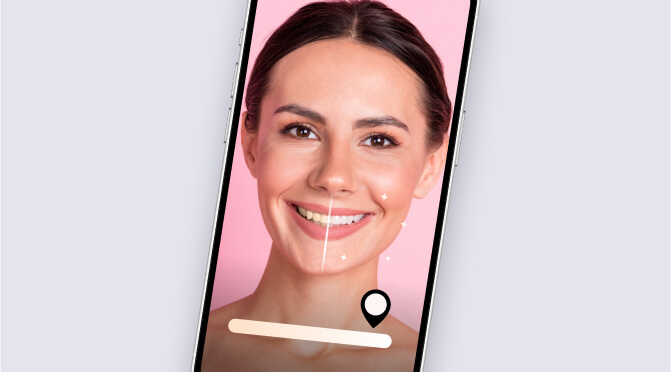
AR teeth whitening benefits

Patient confidence
Seeing the expected results of the bleaching inspires confidence in patients.

More sales
Impressive visuals during live presentations and ads attract new people to your practice.

Brand recognition
Implementing the latest technology positions your company as the one that provides the best service.

Why teeth whitening filters by Banuba
- Works on mobile, web, and desktop
- Online and offline modes
- No special hardware required
- Realistic, natural-looking whitening
- Supports any enamel color
- Proprietary technology covered by relevant patents
- Smooth performance in real-time
- Quick technical support
- 14-day free trial available
-
Yes. The Banuba Face AR SDK includes an LLM-friendly documentation file designed for AI-assisted development and internal knowledge systems:
Banuba Face AR SDK LLM-friendly documentation (llms-full.txt)
This structured Banuba Face AR SDK text file can be used with AI tools to streamline onboarding and developer workflows.
-
The official technical documentation for Banuba Face AR SDK is available online and includes requirements, setup instructions, and configuration details:
Banuba Face AR SDK iOS documentation
Banuba Face AR SDK Android documentation
Banuba Face AR SDK Flutter documentation
Banuba Face AR SDK Rect Native documentation
Banuba Face AR SDK Web documentation
Banuba Face AR SDK Unity documentation
Banuba Face AR SDK Desktop documentation
This Banuba Face AR SDK documentation should be your primary reference during integration.
-
You can access official integration code samples for the Banuba Face AR SDK on GitHub. Banuba provides platform-specific examples to help you integrate faster:
Banuba Face AR SDK iOS integration code sample
Banuba Face AR SDK Android integration code sample
Banuba Face AR SDK Flutter integration code sample
Banuba Face AR SDK React Native integration code sample
Banuba Face AR SDK Desktop integration code sample
Banuba Face AR SDK Web integration code sample
Banuba Face AR SDK Unity integration code sample
These Banuba Face AR SDK repositories include setup instructions and minimal working examples for quick deployment.
-
The Banuba Face AR SDK provides official cross-platform plugins to simplify integration into hybrid applications:
Banuba Face AR SDK Flutter plugin
Banuba Face AR SDK React Native plugin
These Banuba Face AR SDK plugins are maintained by Banuba and support faster implementation for cross-platform apps.